PhotoVault
Copies a shoot to several drives and proves every copy is identical before the card is wiped.
A tool for photographers that runs on my Mac. It copies the photos off a memory card to more than one drive, checks that every copy is a perfect match, and only then tells you the card is safe to erase.
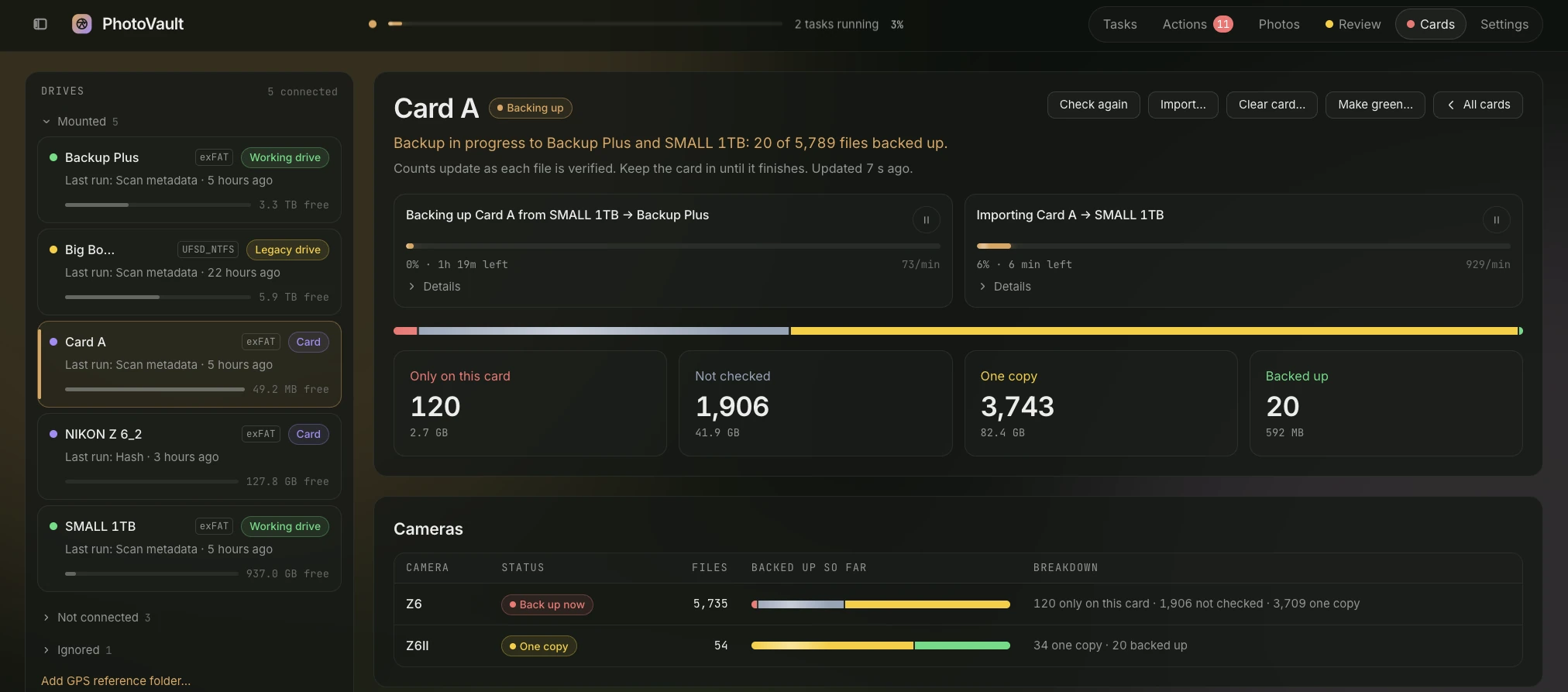
- 0 mismatches out of 21,474 verified copies
- 2,257 photos geotagged from my phone
- 127k files tracked on 9 drives and cards
The problem
A photographer comes home with memory cards that hold the only copy of the work. Every file has to reach several drives, and be shown to be identical there, before the card is wiped. I have lost whole cards of photos before, so I count a shoot as safe only once it exists, verified, on more than one drive.
"The copy finished" is not verification. The operating system keeps recently written data in memory (the page cache) and will happily read back bytes that never reached the disk. Camera file numbers roll over, so two different photos can end up with the same name. And nothing tells you when a card is actually safe to format.
What it does
- Safe to clear, file by file. Every file on a card is red while it exists only there, yellow once one drive has a checked copy, and green once two drives or the offline master do. Only green files can be cleared, and clearing needs a dry run and a typed file count.
- Location from my phone. My Z6 and Z6 II do not record GPS. PhotoVault matches each camera photo to the iPhone photos taken around the same time and suggests a location, which I confirm on a map: 2,257 so far. The same phone photos show when a camera clock is a time zone off.
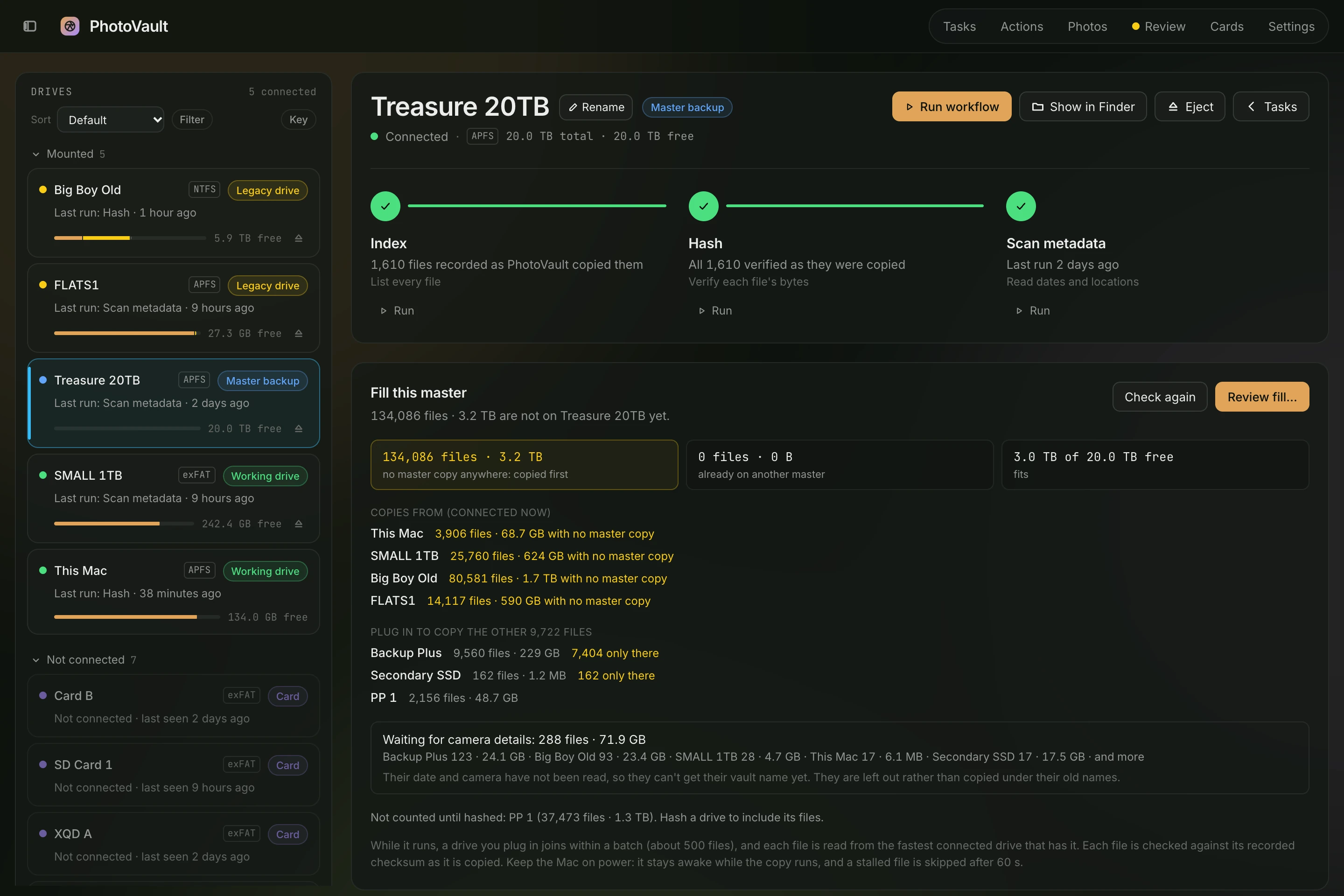
- The offline master fills itself. It works out which files have no copy on the master yet, copies each one from the fastest connected drive that has it, and names the drives to plug in for the rest.
- Nothing collides. RAW files, JPEGs and sidecars from the same shot are grouped and named by a fixed rule, so when a camera’s file counter rolls back to 0001, nothing collides.
- Old drives, read only. It indexes my old drives without writing a byte to them. On one of them it found 113 GB of duplicates.
- It keeps its own numbers. It records how much it reads and writes on each drive, how fast, and any read errors. That is where the numbers on this page come from.
Follow one file
This is the one path every photo takes from a card to a cleared card. Press Run to watch a file go through it, or pick a step.
- Card. The card is only ever read. Each file is looked up in the catalog to see whether it is already backed up somewhere.
- Copy. Files are hashed while they are copied to a temp file on the SSD, then synced so the bytes really reach the drive.
- Verify. The copy is read back from the disk, not from memory, and hashed again. If the checksums match, it is renamed into place.
- Catalog. The database records the shot, its files, and every drive that has a good copy of them.
- Second copy. A second drive gets its own checked copy, usually from the first SSD rather than the card. Then the files on the card count as backed up.
- Clear. Only backed-up files are deleted, and each one is checked again right before it goes.
How it is built
PhotoVault is a Python engine with a web app on top, and all of it runs on my own laptop. The engine is a command-line program that does the real work, one job per run. The web app starts those runs and shows them live. One SQLite file keeps track of what is on every drive.
Architecture diagram. A React web app talks over HTTP to a local Python server. The server starts the PhotoVault engine as a separate process and reads its progress as JSON lines. The engine reads metadata through ExifTool and Apple Photos, reads camera cards and old drives, writes verified copies to working drives and the offline master, records each file in the catalog database, and logs read and write stats to a metrics database. The server also reads the catalog and saves edits to it.
- Web app. React and TypeScript, served from my own machine only. It shows drives, cards, running jobs and the photo timeline. It never reads a drive itself.
- photovault serve. A small Python server that only listens on this machine. It answers the web app, and for anything real it starts the engine as a separate process and passes the progress along.
- Engine. The command-line program. An import, a backup, a card check or a card clear is each one run of it, and it reports progress one message per line. A run I start in a terminal shows up in the web app too.
- catalog.sqlite. The source of truth: which drives exist, every file on them, and which copies are verified. Every answer in the app, like whether a card is safe to clear, is a question asked of this file.
- metrics.sqlite. Kept apart because it is only telemetry. I can delete it and lose nothing that matters.
- Drives. Cards and old drives are only read. Copies are written to working drives and the offline master, and only by the copy path above.
Choices I made
- No background process. The engine only runs while a job is running, so there is nothing sitting in the background that can crash, leak, or keep a drive busy. The cost is that a job and the web app have to talk through the catalog and a few small files instead of shared memory.
- A file is its bytes. The SHA-256 checksum is a file’s identity. Names, sizes and dates only help narrow down where to look. It costs one full read of every file, but a renamed or moved copy is still recognised.
- One place writes photos. A single module copies bytes, and everything else goes through it. The safety steps from “Follow one file” live in one spot I can test hard, instead of in every feature that has to remember them.
- Time is how a photo finds its location. A Z6 has no GPS, so the only thing its photo shares with one from my iPhone is when it was taken. Each photo is turned into one moment in universal time, adjusted for the time zone it was shot in and for any clock error, and matched to the nearest phone location.
- The originals are never edited. Locations, keywords and credit are saved in the catalog and written to XMP sidecars, small text files next to the copies. The RAW files stay exactly as the camera made them, so a bad edit costs me a text file, not a photo.
When something goes wrong
- A drive is unplugged halfway through a copy. The job stops as paused. Every finished file was committed on its own, so running it again starts at the first unfinished one, after the leftover temp files are cleaned up.
- A copy reads back different from what was written. The temp file is deleted, the file is marked failed and the incident is logged. Nothing is renamed into place.
- A backup source no longer matches its checksum in the catalog. The copy fails, so one damaged file cannot spread to another drive.
- I clear a card and a file is not actually backed up. Each file is checked against the catalog again right before it is deleted. If it is no longer green, it stays on the card.
Built with
Python · SQLite · SHA-256 · F_NOCACHE · JSON-lines · React · TypeScript · Leaflet maps · Apple Photos · Lightroom .lrcat